VideoGet FAQ
Q: What is VideoGet?A: VideoGet is a powerful, easy-of-use tool that allows you to download video from online video services, such as YouTube, Google Video, etc.
Q: Is VideoGet FREE?
A: No, VideoGet is not free, but almost free, for $29.95 you'll get full registered version and all minor lifetime upgrades.
Q: Is it legal?
A: There is a ton of good content on YouTube, but copyright infringement claims and DMCA take-down notices mean that any given video can disappear at any time. Having a local copy of the video means you won't lose access if YouTube removes the video from their site. And if you convert the video to any format, you can view it more comfortably for your needs. Doing this appears to be in compliance with YouTube's Terms of Use, as long as you do not distribute the videos to others, and you retain any copyright notices on the files (see sections 2A and 4).
Nuclear Coffee does not take any responsibility to content you are attempting to download, since we can't handle it.
We strongly recommend you not to download any copyrighted material, music videos, etc due to law restrictions. VideoGet doesn't change content of any downloaded videos; it may only convert it to different video file format for more comfortable video watching. Nuclear Coffee has no control over, and assumes no responsibility for, the content, privacy policies, or practices of any third parties.
Q: VideoGet License Key is incorrect. When I entered (copy and paste) the product key, the program rejected it saying it was invalid.
A: The license key should be valid. Please ensure that you do not miss any characters and do not include any spaces.
If you copy and paste the license key, make sure you do not include any spaces at the beginning or at the end.
If you are using keyboard to enter the license key, please make sure that you aren't accidentally mistyping any characters, interposing O's and zeroes, and the like.
Note. If you receives license key as ABCD-ABCD-AB, it should be entered exactly this way, not as ABCDABCDAB. Please make sure you include all the characters.
Q: Do I need to purchase an additional license to use VideoGet on 2 computers?
A: Yes, you should purchase separate licenses for each device. Once you activate VideoGet on your computer, you can't use this license key on other computers. ONE license can be activated only on ONE computer.
Q: How to download and convert video for iPod with VideoGet?
A: You can convert your videos into iPod compatible format following a few easy steps below:
Step 1: Find the video you would like to download from the Internet and copy the URL of the video.
Step 2: Open your VideoGet video downloader.
Step 3: Paste the copied URL into the VideoGet list. Alternatively, use the VideoGet plug-in for Internet Explorer or Mozilla Firefox to add video to the list of downloads.
Step 4: Choose your iPod type from the "Output format" drop-down menu at the bottom part of the VideoGet main window.
Step 5: After you've selected the conversion settings, click on the orange button which is marked with a "down arrow" sign. This will start the download.
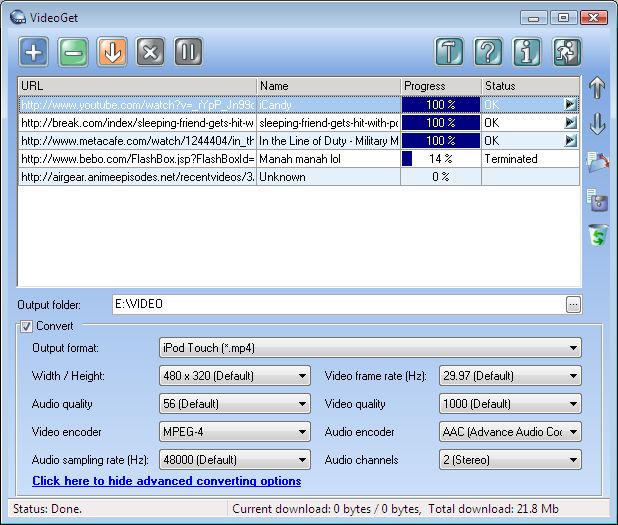
Video download will take up a several minutes or less, depending on your Internet connection speed and video size.
Q: Button to download videos does not appear on the Internet Explorer toolbar
A: If you're using Internet Explorer 7.0 or Internet Explorer 8.0, please follow the instructions below:
Click with the right mouse button on the Internet Explorer toolbar:
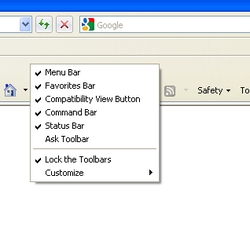
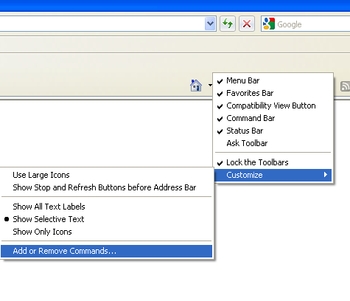
Then choose the following: "Customize" => "Add or Remove Commands"
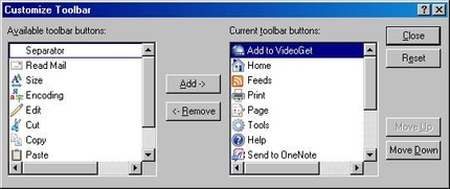
Select the VideoGet button in the "Current Toolbar buttons" and move it up until it appears on top of the list. Then close the window:
Now the VideoGet quick download button is displayed on your Internet Explorer toolbar:
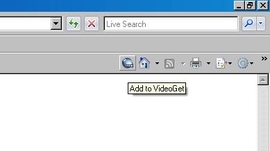
If you're using Internet Explorer 6.0, please go to "View" => "Toolbars" => "Standard Buttons" in your Internet Explorer browser.
Q: How do you get the Mozilla Firefox add-on?
A: The VideoGet quick download button for Mozilla Firefox is added automatically during VideoGet installation. If you did not add during the VideoGet installation, you can do it manually later.
To add the VideoGet button, choose the following in your Mozilla Firefox menu: "Tools" => "Add-ons". If you can't find VideoGet plug-in in the list, please browse to the folders where VideoGet is installed. In our case its: C:\ProgramFiles\Nuclear-Coffee\VideoGet\Plugins. Then please click on VideoGet_FF.xpi.
Then install it:
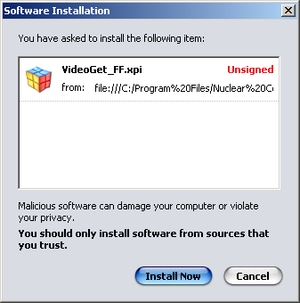
You're done. Now you can download video directly from your browser with just one click.
Q: How to save links I want to download and download them later?
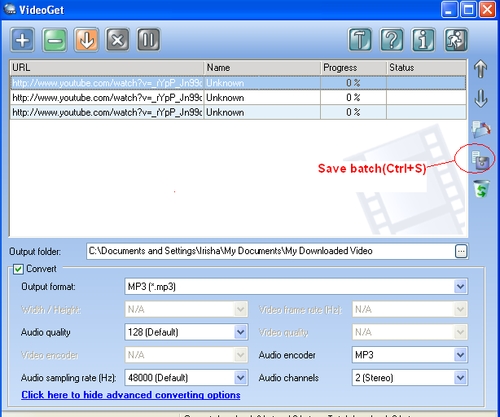
A: With the batch download option you will be able to add several links for video to the download list, save them to a batch (Ctrl+S) and view / open the saved xml file (Ctrl+O) later. Then you will be able to download all saved videos in a batch any time you wish.
1. Save all links to a batch. To do this, simply click on the button as shown below, and all links for videos on the list will be saved as XML file to a chosen location. Now you can close the program.
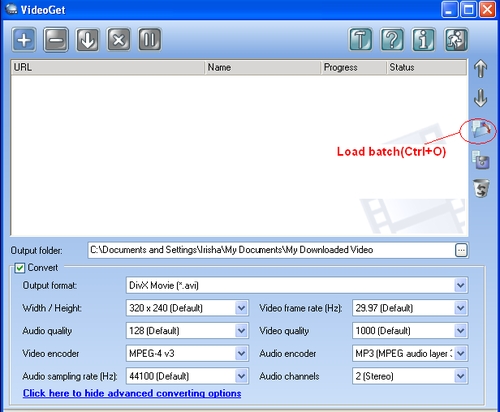
2. To load a batch for video download, simply click on the "Load batch" button as on the image below. After that, simply click the download button to download all videos.
That's it. Now you can postpone video download by saving links to a batch and continuing the download any time you wish.
Q: The video was downloaded successfully, but I can't watch it. Only sound
A: Such problem occurs when you don't have proper video codecs installed on your computer. Please check the suggested codecs and players.
Q: I have a feature request to VideoGet, can I send it to you?
A: Of course, your feature requests help us improve VideoGet according to your needs.
Q: I want to download video from website which you don't support. What to do?
A: You can request to support this website by making post to our support area. But we don't guarantee that we'll be able to support this website due to specific technical requirements.
Q: VideoGet has started to support a new websites. How did you do that?
A: The main goal of VideoGet is dynamical update of application script every time when you start the application. You can change these settings in the "Options" dialog. But we recommend updating the program to keep up to date with the latest changes, as popular video websites sometimes may change their script or we can introduce new supported websites.
Q: I paste valid link into "Add URL" dialog, but it doesn't download the video.
A: Perhaps the website you want to download video from, has changed its script and we have not handled it yet. You may post your problem to our support area and you will get our feedback during next 2 business days.
Q: Are there plug-ins for firefox or internet explorer browsers?
A: Yes, there are. VideoGet has FireFox and Internet Explorer Extensions
Q: Will VideoGet download streaming media via MMS, RTSP, RTMP protocols?
A: Now VideoGet also supports MMS protocol. Though, RTSP and RTMP are not supported yet
Ordering FAQ
Q: Do I need to pay once for the software, or there are monthly / yearly fees?A: No, you need to purchase it only once. All minor updates are provided for free.
Q: What's the refund policy?
A: Please refer to this link
Q: On which operating systems will your programs work?
A: All our programs are working on Windows NT / 2000 / XP / Vista / Windows 7 / 8 / 8.1 / 10 / 11.
Q: Is it secure to order online?
A: Yes, it is 100% secure. We use a major credit card and order fulfillment center called CleverBridge.
Q: I have just purchased the program. What's next?
A: After your order details will be verified by CleverBridge, you will receive email with activation key. If you don't know how to activate it - please visit this page
Q: What's the upgrade policy?
A: Any updates released within the same Major version is provided free of cost. If we'll add a drastic amount of features then we may up the version number and the cost of the upgrade will be nominal and will be determined at that time.
Q: I lost my license key. How can I get a new one?
A: Please visit this page: Retrieve my registration info